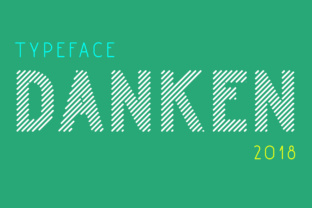
Danken: A Modern, Rounded Stripes Font for Creative Projects
If you're looking for a font that brings a fresh, dynamic feel to your design work, Danken might be exactly what you need. This rounded stripes font is ideal for display purposes, offering a unique visual style that stands out in both digital and print formats. With its 45-degree angle lines and soft curves, Danken adds a modern, branded touch to any project. But like any tool, it's important to understand how to use it effectively to avoid common pitfalls.
What Makes Danken Unique?
Danken is more than just a font—it's a design element that can transform the look of your work. The rounded lines and angled patterns create a sense of movement and energy, making it perfect for logos, headlines, and branding materials. Its versatility allows it to work well in both minimalist and bold designs, depending on how it's applied. However, not everyone realizes that the font’s strength lies in its balance between simplicity and impact.
One of the most appealing aspects of Danken is its ability to convey a modern, professional aesthetic without being overly complex. This makes it a popular choice among designers, marketers, and small business owners who want to elevate their visual identity. But understanding how to use it properly is key to achieving the desired effect.
Common Mistakes When Using Danken
Despite its appeal, many users make mistakes when working with Danken. One common error is using it in large blocks of text. While the font looks great in headlines or short phrases, it can become difficult to read when used for body copy. This is because the rounded lines and angled strokes may not provide enough contrast for long paragraphs, leading to poor readability.
Another mistake is overusing the font in multiple areas of a design. For example, applying it to a logo, heading, and subheading all at once can create visual clutter. Instead, it's better to reserve Danken for key elements where it can have the most impact. This approach helps maintain clarity and professionalism in the overall design.
Choosing the Right Size and Spacing
When working with Danken, size and spacing are crucial. If the font is too small, the details may get lost, especially in printed materials. On the other hand, if it's too large, it can overwhelm the design. Finding the right scale for your specific project is essential.
Spacing also plays a role in how the font appears. Tight spacing can make the rounded lines look cramped, while excessive spacing can make the text appear disconnected. Experimenting with different settings will help you find the optimal look for your work.
How to Avoid Common Pitfalls
To get the most out of Danken, start by considering the context in which it will be used. For instance, if you're designing a website, test the font on different screen sizes to ensure it remains legible. If you're creating a logo, focus on how it looks in both color and black-and-white versions.
Another practical tip is to pair Danken with complementary fonts. Using a simpler, more traditional font for body text can create a nice contrast while allowing Danken to shine in its designated areas. This combination enhances readability without sacrificing style.
Testing and Refining Your Design
Before finalizing any project, take time to test your design in real-world scenarios. Print a sample if possible, or view it on different devices to see how it performs. This step can reveal issues that aren't obvious on a computer screen, such as poor legibility or inconsistent spacing.
Also, consider the audience you're targeting. A font that works well for a tech startup may not be appropriate for a law firm or educational institution. Understanding your audience’s preferences and expectations can guide your design choices and improve the overall effectiveness of your work.
What to Check Before Using Danken
Before downloading or purchasing Danken, make sure you understand the licensing terms. Some fonts come with restrictions on commercial use, so it's important to review the license agreement carefully. This prevents potential legal issues down the line, especially if you're using the font for a business-related project.
Additionally, check the file format and compatibility. Danken should be available in standard formats like OTF or TTF, which work across most design software. If you're unsure about the file type, reach out to the font provider for clarification.
Exploring Alternatives
If you're not satisfied with Danken, there are other fonts that offer similar styles. Fonts like Beau Sans or Quicksand provide a clean, modern look that can complement your design. However, it's important to choose a font that aligns with your brand's identity and the message you want to convey.
Trying out different options before committing to one can save time and prevent unnecessary revisions. Many font websites offer free trials or samples, allowing you to test the font in your own projects before making a decision.
Final Thoughts on Using Danken
Danken is a powerful tool for adding a modern, branded look to your designs. Its rounded stripes and 45-degree angles make it stand out, but it's important to use it wisely. By avoiding common mistakes and focusing on practical application, you can maximize the font's potential and enhance the quality of your work.
Whether you're a designer, marketer, or small business owner, taking the time to understand how to use Danken correctly can lead to better results. From choosing the right size to pairing it with complementary fonts, every decision contributes to the overall success of your project. With careful consideration and experimentation, you can unlock the full creative potential of this unique font.