Colenak: The Layered Typeface That Brings Playful Energy to Children's Design
Typography has a way of shaping how we feel about a design before we even read a single word. The curves, the weight, the spacing—they all communicate something. When the audience is young, energetic, and drawn to brightness, the typeface needs to match that spirit. Colenak steps into that space with confidence. It is not just a font. It is a design tool built around layering, fun, and a distinctly playful aesthetic that feels lifted straight from a Saturday morning cartoon or a beloved video game title screen.
What makes Colenak stand out in a crowded field of display fonts is its deliberate nod to the visual language of childhood entertainment. Games and cartoons have long used bold, exaggerated letterforms to capture attention. Colenak draws from that tradition while offering modern designers a flexible system for creating custom looks. If you have ever struggled to find a typeface that feels both youthful and stylish, this one deserves a close look.
What Exactly Is Colenak?
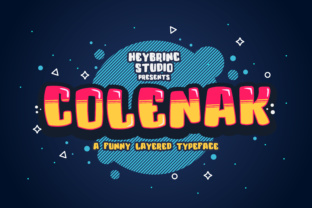
At its core, Colenak is a layered typeface designed for maximum visual impact. It comes with multiple weights, outlines, shadows, and decorative elements that can be stacked on top of one another. This layering system is its defining feature. Instead of being stuck with a single static look, you can combine different layers to produce depth, color contrast, and texture. The result is typography that feels dimensional and alive—perfect for catching the eye of a child or anyone young at heart.
The inspiration behind Colenak comes directly from the world of games and cartoon titles. Think of the bold lettering on a classic platformer game or the playful text on a children's TV show intro. That energy is baked into every character. The letterforms are rounded where they need to be, sturdy in their stance, and full of personality. They do not whisper. They announce themselves with a grin.
Why Layering Matters in Modern Design
Layering typefaces is not a new concept, but Colenak makes it exceptionally accessible. In the past, achieving a multi-colored, 3D text effect often required hours of manual work in vector software. You had to duplicate text, offset it, change colors, and hope everything aligned perfectly. With Colenak, the layers are already designed to fit together. You simply choose which ones to use and assign colors as you see fit.
This approach saves time and opens up creative possibilities for designers who may not be comfortable with advanced vector manipulation. A beginner can produce professional-grade results, while a seasoned designer can push the system further by mixing layers in unexpected ways. The practical benefit is clear: faster workflows without sacrificing quality.
Consider a scenario where you are designing a poster for a children's theater production. You want the title to stand out, to feel energetic, and to hint at the fun inside. With Colenak, you can use the base layer in a bright yellow, add an outline in dark blue, and finish with a shadow layer in light gray. The whole process takes minutes. The result looks like it took hours of careful craftsmanship.
Where Colenak Fits Best
Colenak is not a typeface you would use for a corporate annual report or a legal document. Its personality is too strong for that. But for any project aimed at children or families, it is an excellent choice. Here are some specific contexts where Colenak shines:
- Children's book covers and interiors: The layered look adds visual interest that draws young readers in.
- Educational materials: Flashcards, worksheets, and classroom posters benefit from typography that feels friendly and inviting.
- Toys and packaging: A toy box or game box needs to compete for attention on a shelf. Colenak delivers that bold, playful presence.
- Event branding: Birthday parties, school fairs, and family festivals can all use a typeface that immediately communicates fun.
- Digital content: YouTube thumbnails, app icons, and website headers aimed at kids can leverage Colenak's layering to create a polished, engaging look.
- Game UI and marketing: Given its roots, Colenak feels right at home in mobile games, indie titles, or promotional materials for gaming events.
In each of these contexts, the layering system gives you room to match brand colors or thematic palettes without feeling constrained. You can go bold with high-contrast combinations or keep it soft with pastel layers. The flexibility is built in.
Practical Benefits of Using a Layered System
Beyond the obvious visual appeal, there are practical reasons to choose a layered typeface like Colenak for your projects. One of the most significant is the ability to maintain legibility while adding decorative flair. Many display fonts sacrifice readability for style. Colenak balances both. The base letterforms are clear and sturdy, so even when you stack multiple layers, the text remains easy to read.
Another benefit is the ability to adapt a single design across different media. A layered Colenak title on a printed poster can be recreated for a digital banner with different color choices that suit screen rendering. You are not locked into one version of the font. You can tweak the layers to suit the medium while keeping the same essential character.
Version control also becomes simpler. If a client wants to see a few variations of a headline, you can generate them quickly by swapping layer colors or turning certain layers on and off. This agility is valuable in fast-paced design environments where revisions are constant.
Colenak also plays well with other typefaces. Because its personality is so distinct, it works best as a display font paired with a neutral, readable body font. A simple sans-serif like Open Sans or Lato provides a calm contrast to Colenak's exuberance. This pairing keeps the overall design balanced and professional.
What to Consider Before Choosing Colenak
As with any specialized typeface, there are a few factors to weigh before committing to Colenak for a project. First, consider the audience. If you are designing for an older demographic or a formal context, the playful energy of Colenak might feel out of place. That is not a flaw in the font. It is a matter of matching the tool to the task.
Second, think about the medium. Colenak's layered effect is easiest to apply in design software that supports multiple text layers, such as Adobe Illustrator, Photoshop, Affinity Designer, or Canva. If you are working in a more limited environment—like a simple word processor or a basic web editor—you may not be able to take full advantage of the layering system. In those cases, you could use a single layer, but you would miss out on what makes Colenak special.
Third, consider color choices carefully. Because layering involves multiple overlapping shapes, high-contrast combinations tend to work best. Light letters on a dark background with a contrasting outline can pop beautifully. Low-contrast combinations, like similar shades stacked together, may lose definition. A little experimentation goes a long way.
Finally, think about scaling. Colenak is designed for headlines and display use. At smaller sizes, the details of the layers may become less visible or even muddled. For body text or small captions, a simpler font is more appropriate. Use Colenak where it can breathe—at larger sizes where every curve and contour has room to shine.
Getting Started with Colenak in Your Workflow
If you are new to layered typefaces, Colenak offers a gentle entry point. Start by selecting a single word or short phrase. Open your design software and create a text layer for the base. Duplicate that layer for the outline or shadow, adjust the position slightly, and change the color. Repeat if you want a third layer. The process is intuitive, and because Colenak's layers are designed to fit together, you do not need to guess at offsets or alignments.
For more advanced users, the fun begins when you start mixing layers in unconventional ways. Try using gradient fills on one layer while keeping others solid. Experiment with transparency. Add texture overlays between layers for a distressed or hand-drawn feel. The system rewards creativity.
Colenak also pairs well with illustrative elements. Because it already has a cartoon-like quality, you can surround it with hand-drawn icons, star bursts, or character art without creating a visual clash. The typeface and the illustrations feel like they belong to the same world.
Observations from Real-World Use
Designers who have used Colenak in children's projects often note how it simplifies the decision-making process around typography. Instead of layering multiple fonts to create a custom look, they start with Colenak and build outward. The typeface does much of the heavy lifting. This is especially helpful when working under tight deadlines or with clients who want to see multiple options quickly.
Another observation is that Colenak tends to elicit positive reactions from non-designers. The bright, playful appearance reads as approachable and fun. Parents, educators, and kids themselves respond well to it. That emotional connection matters in children's design, where the goal is often to create a sense of joy or curiosity.
Some users have noted that the font works particularly well in digital contexts where animation is possible. Imagine a title where each layer appears sequentially—first the base, then the outline, then the shadow—creating a building effect that draws the eye. This kind of treatment is hard to achieve with a standard typeface but feels natural with a layered system like Colenak.
Final Thoughts on a Playful Powerhouse
Colenak occupies a sweet spot in the typography landscape. It is stylish without being pretentious. It is fun without being juvenile. It is sophisticated enough for professional use yet accessible enough for anyone to pick up and experiment with. The game and cartoon inspiration gives it a nostalgic familiarity, while the layering system keeps it firmly rooted in modern design needs.
For designers working on children's themes—whether in print, digital, or packaging—Colenak offers a reliable way to inject energy and personality into their work. It reduces the time spent on manual effects, encourages creative color play, and delivers results that stand out. If your next project needs to grab attention and hold it with a smile, Colenak is worth adding to your toolkit.