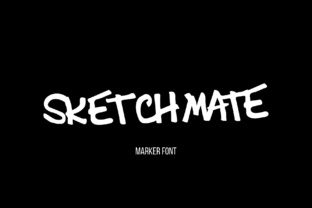
Sketchmate: A Creative Typography Solution
Sketchmate is a dynamic display font that brings a handmade charm to any design project while maintaining a level of legibility that script fonts often lack. Its unique character makes it ideal for adding personality to visual communication without compromising clarity.
For designers looking to infuse warmth and authenticity into their work, Sketchmate offers a versatile option that can elevate everything from brand identities to digital interfaces. Its friendly appeal and eclectic style make it a go-to choice for those seeking to balance creativity with professionalism.
Why Sketchmate Matters in Graphic Design
In the world of graphic design, typography plays a crucial role in shaping how audiences perceive a message. Sketchmate stands out by combining the irregularity of hand-drawn elements with a structured form that ensures readability across different mediums. This makes it an excellent choice for projects where both aesthetic appeal and functionality are essential.
Whether you're working on branding materials or editorial layouts, Sketchmate can help create a cohesive visual language that resonates with your target audience. Its ability to blend into various design systems makes it a valuable addition to any designer's toolkit.
Practical Applications of Sketchmate
Sketchmate’s flexibility allows it to shine in multiple design contexts:
- Branding and Logo Design: Use it to craft logos that feel personal and approachable, perfect for startups or creative businesses.
- Marketing Materials: Incorporate it into posters, flyers, or brochures to add a touch of creativity without sacrificing readability.
- Social Media Content: Apply it to captions, banners, or graphics to stand out in crowded digital spaces.
- Website and UI Design: Enhance headings or call-to-action buttons with a distinctive yet legible typeface.
Its adaptability extends to packaging design, advertising campaigns, and even merchandise, making it a reliable asset for a wide range of creative projects.
Design Tips for Using Sketchmate
When integrating Sketchmate into your workflow, consider the following tips to maximize its impact:
- Balance Contrast: Pair it with simpler fonts to ensure visual hierarchy and readability, especially in complex layouts.
- Test at Different Sizes: Verify that it remains legible in both large headlines and smaller text blocks.
- Align with Brand Identity: Ensure it complements your color palette, imagery, and overall design direction.
By thoughtfully applying Sketchmate, you can enhance user engagement and create a more memorable visual experience. It’s particularly effective when used sparingly to highlight key messages or evoke a specific mood.
Ultimately, the success of any design project depends on the thoughtful selection of creative assets. Sketchmate exemplifies how a well-crafted font can contribute to a polished, professional outcome while supporting the broader goals of visual communication and brand expression.