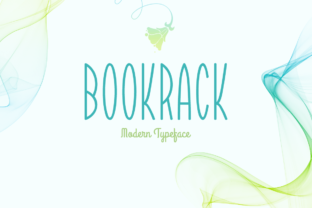
Bookrack: A Cutesy Font for Lighthearted Design Projects
Bookrack is a distinctive sans serif font that brings a playful and relaxed aesthetic to design projects. Its cutesy appearance makes it ideal for creative work that requires a friendly, approachable tone. While it may not be the best choice for formal or professional contexts, Bookrack excels in scenarios where a lighthearted vibe is desired.
The font’s clean lines and soft curves contribute to its overall charm, making it stand out in a sea of more rigid typefaces. It is particularly well-suited for branding, illustrations, and digital content that aims to connect with a younger or more casual audience. However, its unique style also means it may not fit all design needs, which is why understanding its strengths and limitations is essential.
What Makes Bookrack Unique?
Unlike many traditional sans serifs that prioritize clarity and neutrality, Bookrack embraces a more whimsical character. Its subtle imperfections and rounded edges give it a handcrafted feel, which can add personality to any project. This makes it a popular choice for logos, social media graphics, and web headers where visual appeal is key.
One of the main features that sets Bookrack apart is its balance between modernity and playfulness. It avoids the overly decorative elements found in some stylized fonts while maintaining a distinct identity. This makes it versatile enough to work in both digital and print formats, though it may not be the best option for long-form text due to its lower readability at smaller sizes.
Comparing Bookrack to Similar Fonts
When evaluating Bookrack, it's helpful to consider how it compares to other fonts in the same category. Many sans serifs, such as Montserrat or Open Sans, are designed for maximum legibility and versatility across a wide range of applications. These fonts are often preferred for body text, headings, and professional documents where clarity is paramount.
In contrast, Bookrack’s focus on visual appeal over functionality makes it less suitable for large blocks of text. However, for short phrases, titles, or decorative elements, its charm can enhance the overall design. Fonts like Quicksand or Raleway offer similar levels of readability while still providing a modern, clean look, making them better choices for more practical use cases.
For those seeking a more artistic or handwritten feel, fonts like Great Vibes or Pacifico might be more appropriate. These options provide a more expressive style but may lack the consistency needed for larger design projects. Bookrack sits somewhere in between, offering a balance of style and usability that works well in specific contexts.
Best Fit Situations for Bookrack
Bookrack is most effective when used in designs that benefit from a light-hearted or nostalgic tone. For example, it could be an excellent choice for a children’s book cover, a boutique brand’s logo, or a social media campaign targeting a younger demographic. Its playful nature helps convey a sense of fun and creativity without being overwhelming.
It also works well in digital environments where visual hierarchy is important. Using Bookrack for headlines, call-to-action buttons, or website banners can draw attention and create a memorable impression. However, designers should avoid using it for body text or lengthy paragraphs, as this can reduce readability and impact the user experience.
Another scenario where Bookrack shines is in personal or hobby-based projects. Whether it’s a DIY craft label, a custom greeting card, or a personal blog header, the font adds a touch of personality that can make the design feel more authentic and engaging.
Limitations and Tradeoffs
While Bookrack has several advantages, it also comes with certain limitations. One of the primary tradeoffs is its reduced suitability for formal or professional settings. In these cases, more traditional fonts tend to be more appropriate, as they convey professionalism and reliability without the risk of appearing too informal or unstructured.
Additionally, Bookrack may not be the best choice for multilingual projects. Some fonts are optimized for specific languages or scripts, and Bookrack’s design may not support all character sets equally. This can lead to inconsistencies in how the font appears across different languages, which is an important consideration for global audiences.
Designers should also be mindful of how Bookrack interacts with other elements in a layout. Its unique style can sometimes clash with more serious or minimalist designs, so careful pairing with other fonts or color schemes is necessary to maintain a cohesive look.
When to Choose Another Font
There are several situations where a different font might be more appropriate than Bookrack. For instance, if the goal is to create a clean, professional look for a business website or document, a font like Roboto or Lato would likely be a better fit. These options provide a modern, neutral appearance that is easy to read and widely compatible across devices and platforms.
Similarly, for projects that require high readability, such as e-books, signage, or instructional materials, a more standard sans serif is usually preferable. Fonts like Arial or Helvetica have been extensively tested for legibility and are often used in environments where clarity is critical.
If the design requires a more dramatic or elegant appearance, fonts like Playfair Display or Cinzel might be more suitable. These options offer a more refined aesthetic that can elevate the visual appeal of a project without sacrificing usability.
Practical Tips for Using Bookrack
To get the most out of Bookrack, start by considering the context in which it will be used. If the design is intended for a casual or creative audience, the font can add a nice touch of personality. However, if the goal is to communicate information clearly and efficiently, it’s best to pair it with a more readable font.
Another tip is to use Bookrack sparingly. Overusing it can dilute its impact and make the design feel cluttered. Instead, reserve it for key elements such as headlines, titles, or accents that need to stand out visually. This helps maintain a balanced and professional look while still leveraging the font’s unique qualities.
Finally, always test the font in different sizes and formats to ensure it works well across various platforms. This includes checking how it appears on mobile devices, printed materials, and different screen resolutions. Making these adjustments can help prevent unexpected issues and ensure a consistent visual experience.