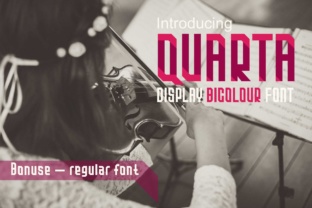
Quarta: A Modern Bicolor Font for Sleek Design Projects
When it comes to typography, the right font can make all the difference in a design. Quarta is a standout choice for those looking to add a modern, geometric flair to their work. This display sans serif font offers a unique bicolor style that sets it apart from traditional typefaces. With its clean lines and bold aesthetic, Quarta is ideal for a wide range of applications, from branding to editorial design.
What Makes Quarta Unique?
Quarta isn’t just another font—it’s a visual statement. The bicolor feature allows designers to create striking contrasts by using two colors within the same letterform. This makes it particularly effective for headlines, logos, and other eye-catching elements. The geometric structure of the font gives it a contemporary feel, making it perfect for modern projects that demand a sleek look.
One of the most appealing aspects of Quarta is its vector-based design. Unlike standard fonts, which are typically monochrome, Quarta includes multicolor vector alphabets, numerals, and punctuation. This means you can manipulate each part of the letters independently, giving you more creative control. Whether you're working on a logo or a poster, this level of customization can elevate your design to the next level.
Using Quarta in Adobe Applications
To fully leverage the features of Quarta, you’ll need vector editing software like Adobe Illustrator CC 2018, InDesign CC 2018, or Photoshop CC 2017. These programs allow you to access the color layers within the font, enabling you to experiment with different color combinations and styles. For example, in Illustrator, you can edit individual parts of each letter, adjusting colors, shapes, and even adding gradients for a more dynamic effect.
If you’re new to working with vector fonts, the process might seem a bit daunting at first. However, once you get the hang of it, the possibilities are endless. You can use Quarta to create custom text effects, such as gradient fills, outlined strokes, or layered designs. The ability to separate the color components also makes it easier to integrate the font into larger design projects without compromising quality.
Practical Applications of Quarta
Quarta is versatile enough to fit into various design scenarios. In the world of branding, it can be used to craft distinctive logos that stand out in a crowded market. Its geometric form adds a sense of professionalism and innovation, which is essential for businesses looking to establish a strong visual identity.
In editorial design, Quarta can be used for magazine covers, book titles, or section headers. Its bold appearance helps draw attention and guide readers through content. Additionally, the font works well in digital media, such as website headers or social media graphics, where clarity and impact are crucial.
For graphic designers, Quarta offers a fresh alternative to more conventional typefaces. It’s especially useful when designing for tech startups, fashion brands, or any project that requires a modern, minimalist aesthetic. The font’s versatility ensures that it can adapt to different contexts without losing its visual appeal.
Benefits of Choosing Quarta
There are several reasons why designers might choose Quarta over other fonts. First and foremost, its bicolor feature provides a level of visual interest that is hard to achieve with standard typefaces. This can help differentiate your work from others and make your designs more memorable.
Another advantage is the font’s clean, modern structure. It’s easy to read, even at smaller sizes, making it suitable for both large-scale and detailed design work. The geometric shapes also lend themselves well to abstract or stylized compositions, offering a range of creative possibilities.
Additionally, Quarta’s compatibility with Adobe applications ensures that it can be integrated smoothly into existing design workflows. This is especially important for professionals who rely on these tools for their daily tasks. The ability to edit vector elements directly within the software streamlines the design process and reduces the need for additional steps or conversions.
Considerations When Using Quarta
While Quarta is a powerful tool, there are a few things to keep in mind when using it. First, the font is best suited for projects that require a high level of visual impact. It may not be the best choice for body text, as its bold style could be overwhelming in long paragraphs.
Also, since Quarta relies on vector editing software, users should have a basic understanding of how to work with vector graphics. If you’re not familiar with Adobe Illustrator or similar programs, you may need to spend some time learning the basics before fully utilizing the font’s capabilities.
Finally, it’s worth noting that the color version of Quarta is only available in certain applications. This means that if you’re using a program that doesn’t support vector color editing, you may not be able to take full advantage of the font’s features. Always check the compatibility of your software before starting a project.
How to Get the Most Out of Quarta
To truly harness the potential of Quarta, start by experimenting with different color combinations. Try using contrasting colors to create a bold, dynamic effect, or go for a more subtle approach with complementary shades. The font’s vector structure allows for a lot of flexibility, so don’t be afraid to play around with it.
Another tip is to pair Quarta with other fonts to create a balanced composition. While it’s a strong standalone typeface, combining it with a simpler, more neutral font can help maintain readability and visual harmony. This is especially useful in multi-page layouts or complex design projects.
Lastly, consider the context in which you’ll be using Quarta. Whether it’s for a corporate logo, a product packaging design, or a digital ad, the font should align with the overall tone and message of the project. By choosing the right application and style, you can ensure that Quarta enhances rather than detracts from your design.